Keyword Research for One Website: What to Check Before Paying for SEO Tools
Before paying for an SEO service, you can collect candidate queries, check the statistics that are available for free, and look at which pages already answer those queries in search. The output of this work is a short list of topics with an explanation of what is worth preparing now and what data is still missing.
In this guide
We will use nakodil.site as the example. The site is building a section about website promotion and choosing the first articles for its readers. On September 21, 2026, we checked 18 queries: nine in Russian and nine in English. This is a Russian-language case study — the Russian search examples below illustrate the method, not English-language demand. Below are five decisions from that check. There are no traffic or sales results from new articles yet.
Start with the reader’s task
Write down who your site helps and what a visitor should be able to do after reading it. For our section, that person is the owner of a small website who wants to choose topics and pages for search traffic.
Now draft a few phrasings that person might type into a search engine. Our candidates included «подбор ключевых слов для сайта» ("keyword research for a website"), «распределение ключевых слов по страницам» ("assigning keywords to pages"), and, in English, seo tools for one website. At this stage these are assumptions. If a query comes from a search report or from a question a reader actually asked you, record it separately and note the source.
Take 5–10 variants for the first pass. That is a convenient limit on the amount of work, not an SEO rule. If you work in two languages, check phrasings and search results separately for each: a literal translation can point to a different task.
- The reader’s taskWhat do they need to accomplish?
- A candidate queryHow might they search for help?
- Check the evidenceLook at available data and search results.
- Make a decisionPrepare · refine · postpone
Record a decision or a specific question to investigate for each candidate.
Free sources and their limits
Google Search Console. If your site is already live, this is the first source. The Performance report shows clicks, impressions, CTR, and average position for your site, grouped by query, page, country, and device, with a date filter (Google's documentation). You will see how often your site appeared in results and for which phrasings. It cannot tell you the total market volume of a query.
Yandex Wordstat is an optional source for sites targeting Yandex. It shows statistics for Yandex queries containing given words, with region and device filters; its "Top queries" section lists popular and related queries for the last month (Yandex documentation). It requires signing in. If you use it, pick the region where you want readers, and save the report period along with the numbers. A query count cannot be converted into a number of future visitors to your site.
Google Keyword Planner is an optional addition. Google calls it free, but core features require completing ad account setup, including billing details (Google Ads documentation). The tool is built for advertising campaigns, so its forecasts are about ads, not organic traffic. If you don't have a suitable account, continue with the other available sources.
Free keyword generators exist — for example, Ahrefs' Free Keyword Generator. In our check on September 21, the query seo tools for one website set to the US returned no results table. We recorded this as "no data obtained": both the cause of the failure and the demand for that query remain unknown.
How to read search results and record geography
Enter a query into the search engine and open several relevant organic results. For a short first pass, three to five pages is enough to start. Don't stop at the titles: read what each page actually lets the visitor do.
For each page, record its URL, its format, and the useful outcome it delivers. For example, a tool groups queries, a roundup helps choose a service, an instruction explains a sequence of steps. Then decide whether you can deliver the outcome the reader expects and what you would add to what is already available.
In our check, the Russian query «кластеризация запросов бесплатно» ("free keyword clustering") surfaced grouping services. We set aside the idea of a regular article for that query: someone who needs to group a list is probably looking for a working tool. That is our explanation of the results we observed, not a universal rule against clustering articles.
Save the date and conditions of each check. We set Google to the US via a URL parameter but did not verify results from a US IP address. We set Yandex to Moscow, while the interface displayed Montijo. These observations were enough to see page formats, but they do not let us claim we examined the exact top results in Moscow or the US. In your own table, record the target region and, separately, the one you were actually able to check.
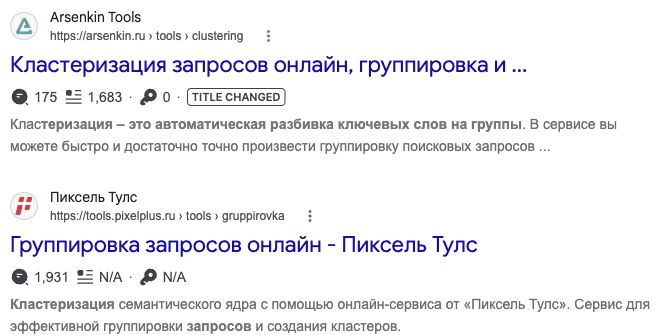
Both results offer grouping tools. Check whether an article alone would meet the reader’s need. This is not evidence of English-language demand. Open the screenshot to enlarge it.
Five queries from our check
For these queries we obtained no numeric estimates of demand, ranking difficulty, or potential traffic. The decisions below rest on the page formats we observed and on our readiness to prepare something useful. All results refer to the check of September 21, 2026.
| Query | What the results showed | Decision |
|---|---|---|
| «подбор ключевых слов для сайта» (keyword research for a website) | tools and roundups | Postponed a general overview: chose a narrower task for the first article |
| «кластеризация запросов бесплатно» (free keyword clustering) | services: PixelTools, Coolakov, Arsenkin (example) | Postponed a regular article: grouping calls for a tool. We did not evaluate the quality of these services in this check |
| «распределение ключевых слов по страницам» (assigning keywords to pages) | instructions and clustering material | Treating it as part of a practical walkthrough. Found no sufficient reason to prepare a separate page now |
| seo tools for one website | roundups and discussions | Kept as an unvalidated candidate for researching one site-owner task. Numeric demand is unknown |
| mangools vs se ranking | product comparisons | Unvalidated candidate, postponed until we have access to both products and have verified demand. We will not write a review without testing |
Build your own table
Fill in a card like this for each query:
| Field | What to record |
|---|---|
| Query and language | The phrasing you are checking |
| Source | Search report, reader question, or your own hypothesis |
| Search engine, region, date | Where and when you looked; geography caveats |
| Pages to compare | URLs, formats, and what they let the visitor do |
| Our material | What outcome we will give the reader and how we will back it up |
| Decision | Prepare, refine, or postpone; a short reason |
| Missing data | What we still need to learn and whether it could change the decision |
An example of the last row for mangools vs se ranking: "We need a demand check and the same task performed in both products. Until then, the comparison is postponed." A research subscription may help with demand, but hands-on experience with both products still has to be gained separately.
For seo tools for one website the decision is different: keep it as a candidate, clarify the site owner's task, and verify demand. For now we assign it no traffic forecast and commission no large comparison article.
When to buy a paid tool
Before paying, write down which data you are missing and which decisions it would change. For example: "We want to compare demand for three topics in one country," or "We need to know which additional queries bring visitors to these competitor pages." Then check whether the plan you're considering provides the required report, export, and geography.
Some statistics are available for free. In our check, the boundary appeared where we could not get the competitive data we needed or comparable estimates for specific queries. That gives us a specific task for paid research. It does not prove that every small site needs the same subscription.
If your table does not yet contain a clear reader task or a useful page format, clarify those first. Extra numbers will not help you write an honest comparison of products you have never used.
What to do now
- Write down the reader's task and 5–10 phrasings they might use to describe it.
- If Search Console already has data, add the queries for which your site received impressions. If there is no data, start from hypotheses and reader questions.
- If you target Yandex, check phrasings in Wordstat with the right region and add variants from its "Top queries." Keep Google checks separate; do not carry Yandex numbers over.
- For each phrasing, open the search results and record the date, region, and the format of the top pages.
- Choose one article to prepare, or name the specific data without which the choice is not yet possible.